

Estimated read time: 2-3 minutes
This archived news story is available only for your personal, non-commercial use. Information in the story may be outdated or superseded by additional information. Reading or replaying the story in its archived form does not constitute a republication of the story.
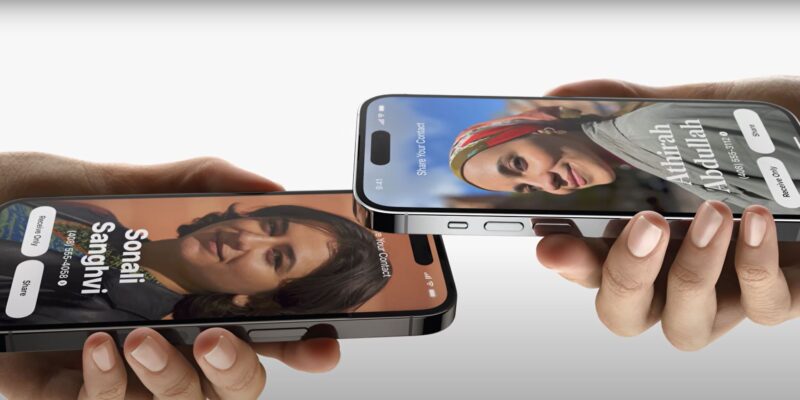
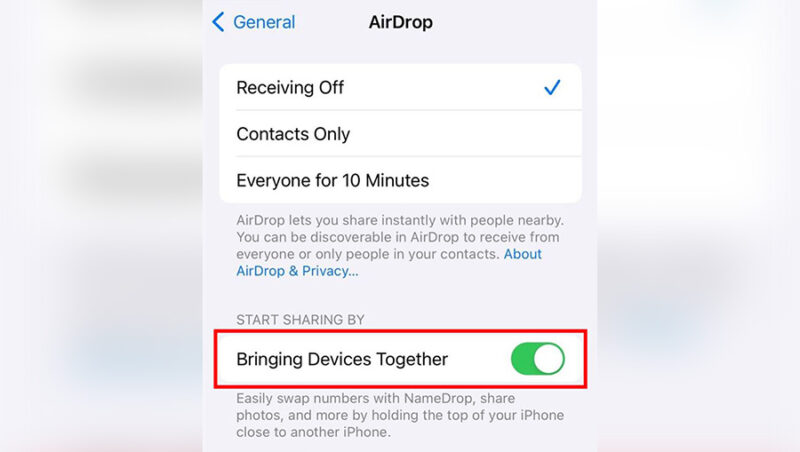
SALT LAKE CITY — Police departments around the U.S. made posts on social media days following an iPhone iOS 17.1 software update, insinuating a defaulted feature might be dangerous. Other sources across the web like Wired and USA Today have debunked the claim in print, starting with the fact that Apple announced the feature back in June at their 2023 developer's conference. The feature is called NameDrop, which was presented at the conference as an extension of AirDrop. With the new iOS update, NameDrop was turned on by default on all updated devices, including Apple watches with the new 10.1 update. The feature works by holding the top of two devices close to each other. What happens next is something most of the social posts failed to mention. The iPhone users enabling NameDrop will then be prompted with the option to "share" their contact, or instead to "receive only." The users can also exit out of the feature and elect to perform neither of those options. Ultimately, NameDrop cannot be completed without the iPhone user taking action.An Apple spokesperson told USA Today that "before a user can continue with NameDrop and choose the contact information they want to share, they will need to ensure their device is unlocked. NameDrop does not work with devices that are locked." Some social posts made by police were updated with further information and acknowledgment that their concern was based on safety precautions. The feature can be deactivated which many commenters said they did. By going into "General Settings" and then "AirDrop," the user can uncheck the "Bringing Devices Together" icon to turn the feature off.