'%3e%3cpath%20d='M34.1406%205.85938C30.3906%202.10547%2025.3047%200%2020%200C14.6953%200%209.60938%202.10547%205.85938%205.85938C2.10938%209.61328%200%2014.6953%200%2020C0%2025.3047%202.10547%2030.3906%205.85938%2034.1406C9.61328%2037.8906%2014.6953%2040%2020%2040C25.3047%2040%2030.3906%2037.8945%2034.1406%2034.1406C37.8906%2030.3906%2040%2025.3047%2040%2020C40%2014.6953%2037.8945%209.60938%2034.1406%205.85938ZM37.0117%2023.543H31.1602V13.5391H27.6328V19.9414C28.1211%2020.6914%2028.3711%2021.582%2028.3711%2022.5625V22.625C28.3711%2023.668%2028.1172%2024.6055%2027.6328%2025.4297V26.6094H36.082C33.4883%2032.9375%2027.2891%2037.3789%2020.0039%2037.3789C10.3711%2037.3789%202.62109%2029.6289%202.62109%2020C2.62109%2010.3711%2010.3711%202.62109%2020%202.62109C29.6289%202.62109%2037.3789%2010.3711%2037.3789%2020C37.3789%2021.1484%2037.2617%2022.2656%2037.0508%2023.3477C37.0391%2023.4141%2037.0234%2023.4766%2037.0117%2023.543Z'%20fill='white'/%3e%3cpath%20d='M22.3086%2018.5352C20.4336%2018.125%2019.9531%2017.8398%2019.9766%2017.1836V17.1406C19.9766%2016.6992%2020.3477%2016.2148%2021.4023%2016.2148C22.582%2016.2148%2023.8867%2016.6797%2025.0781%2017.4766L26.8516%2015.0195C25.4453%2013.8906%2023.707%2013.3398%2021.5547%2013.3398C18.5195%2013.3398%2016.4375%2015%2016.4063%2017.4766V17.5352C16.3633%2020.2617%2018.5859%2020.9805%2021.293%2021.6016C23.0391%2021.9766%2023.5703%2022.3164%2023.5703%2022.9609L23.5469%2022.9766C23.5469%2023.3906%2023.2578%2023.7031%2022.7852%2023.8359C22.5742%2023.9062%2022.1289%2023.9727%2021.5156%2023.9727C20.7617%2023.9727%2019.7539%2023.8633%2018.6328%2023.4844C18.0898%2023.2891%2017.4727%2023.0039%2016.8047%2022.6133L20.1406%2026.625C20.2813%2026.6602%2021.0977%2026.8516%2021.7734%2026.8516C25.0039%2026.8516%2027.0859%2025.2461%2027.1094%2022.6328V22.5703C27.1602%2020.1133%2025.2148%2019.1719%2022.3086%2018.5352Z'%20fill='white'/%3e%3cpath%20d='M5.24219%2013.5664V26.6133H8.75391V23.7578L10.2969%2021.9531L14.2031%2026.6133H18.3867L12.3555%2019.5195L17.4023%2013.5664H13.4531L8.75391%2019.0586V13.5664H5.24219Z'%20fill='white'/%3e%3c/g%3e%3cdefs%3e%3cclipPath%20id='clip0_97_2430'%3e%3crect%20width='40'%20height='40'%20fill='white'/%3e%3c/clipPath%3e%3c/defs%3e%3c/svg%3e)




Estimated read time: 6-7 minutes
RIVERDALE — Artificial intelligence is creating more convincing scams, including fake emails, cloned voices and spoofed caller IDs. And older Utahns are particularly susceptible to falling for scams. The Federal Trade Commission complaint data shows that in the first three quarters of 2025, Utahns aged 80 and over reported average losses of $7,675 to scams, nearly 40 times higher than people in their 20s.
Related: New scam targets Utah sellers on any online marketplace with convincing trick

For Marvin Birt, 90, that number was far worse. He lost over $500,000 in a fake sweepstakes scam after his wife passed away. “Had I been with her, I’d never even entered,” Birt said. He thought he'd won $120,000 ... all he had to do was pay the taxes. “I just thought, ‘You doggone fool, why didn’t you stop way sooner?’”
Testing scam detection apps

Stories like this inspired the KSL Investigators to find solutions to this growing problem. We partnered with cybersecurity expert Earl Foote, founder of Nexus IT Consultants, to find out: Can technology stop scams before they succeed? We tested four popular scam detection apps: McAfee Scam Detector , Trend Micro Scam Check , Norton Genie and BitDefender Scamio to see how well they detected some of the most common scams. First, we tried a phishing scam – an email designed to trick you into clicking a link and handing over personal information. “The message alone looks very suspicious, right?” said Foote. But in our test, only Norton Genie flagged our message. The rest gave it the okay. Next, we tried a vishing scam. That’s when fraudsters spoof caller ID to make you think you’re talking with a trusted institution, like a bank or the police. For that test, we used AI to describe various scripted calls including a fake bank call as well as a legitimate phone call from a bank and pasted the text description into each app. Norton Genie asked several follow-up questions. “Well, it’s asking some good ... right questions,” said Foote. Ultimately, all of the apps flagged it as a scam. We also examined smishing scams, which are often sent as text messages on mobile devices, to convince you to click on a link and/or provide personal information. We submitted the smishing examples in two ways: by pasting in the text of the messages, as well as providing screenshots. Overall the apps performed better with the text. However, no app passed all smishing tests. Emotional scams didn't test as well on the apps. That’s when a scammer creates a relationship of trust over time, before asking for money, often called a romance scam. We used AI to create two different stories to test out the apps. In one example, a scammer said they were overseas, their cards are frozen, but their sister was hurt and needed surgery. They asked for $2,500, which they promised to “wire back” as soon as they could. That more complex scam caused some of the apps to glitch or freeze. Only Norton Genie and McAfee gave a clear warning. ScamCheck couldn't process the full message. And Scamio wouldn’t give a firm answer, instead labeling the message as a likely scam. “I think it didn’t want to get in trouble,” said Foote. Some also struggled with perfectly safe emails, like confirmation of an Amazon order. Trend Micro flagged that very important purchase as a scam. Overall, the apps did better with text than screenshots. Most apps struggled to analyze images, especially if they contained a link or email address, which can be crucial in detecting a scam. “It’s not going to be able to go to the link because it can’t read what the link is,” said Foote. And screenshots often caused the apps to freeze.
How the apps stack up
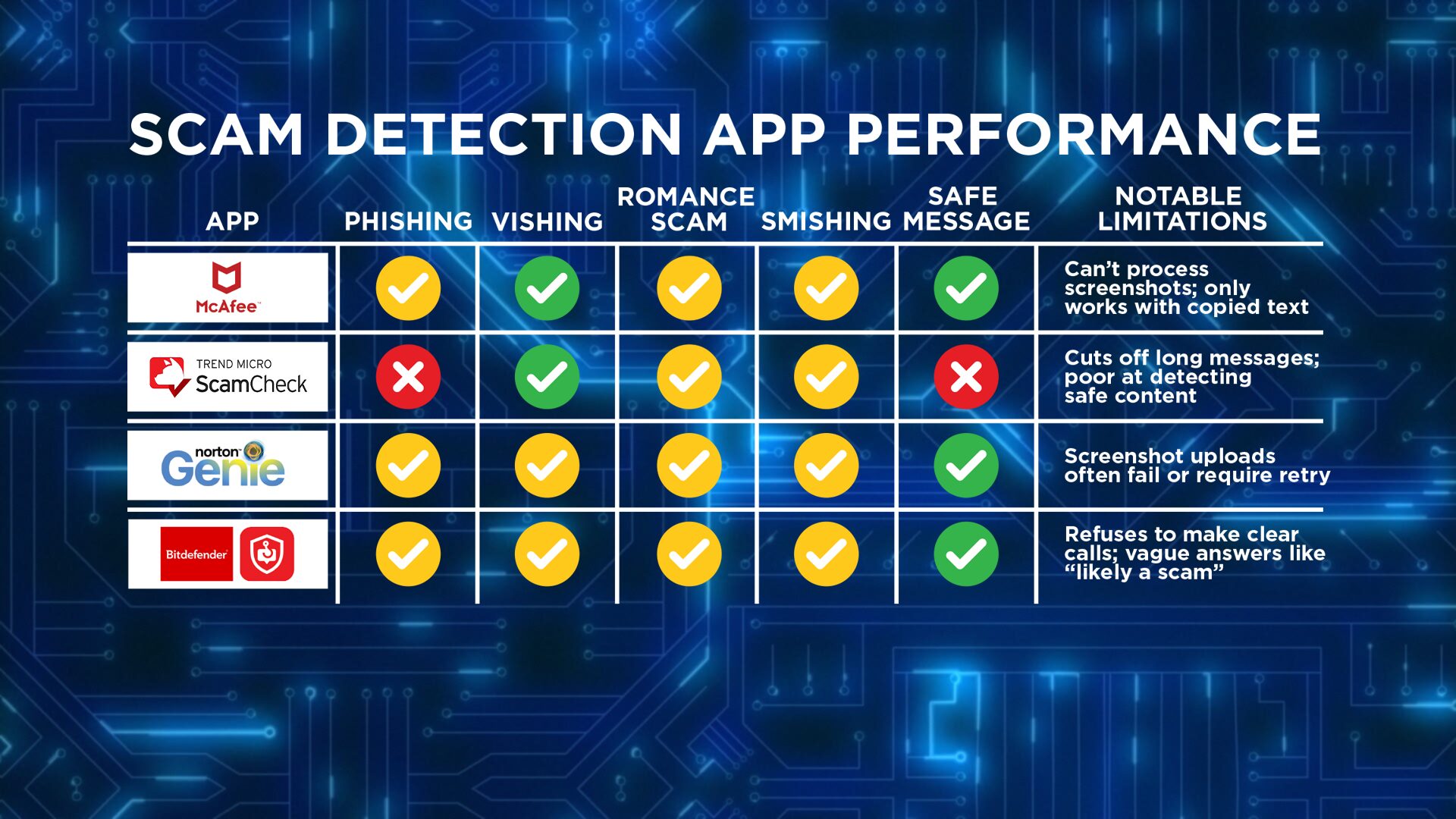
None of the apps we tested received a perfect score, but some performed better than others. McAfee Security was the most reliable overall. However, it does not support screenshots and requires users to copy and paste text. Norton Genie passed the safe message test and ranked second in overall reliability during testing. That being said, we had to reupload the same test several times because the app was having issues. Trend Micro Scam Check performed well with vishing but had two major misses. It failed to flag phishing scams and incorrectly flagged our legitimate Amazon message. It also had a character limit which can make certain submissions challenging. BitDefender Scamio confirmed that the two legitimate messages were safe. However, the app never stated with certainty that any of our submissions were a scam, instead flagging them as “likely suspicious,” making it difficult to know when a scam was truly confirmed. The app also failed to recognize scams in almost every submission category stating that the submission “looks safe.” The cost for the apps varies. Bitdefender Scamio and Norton Genie can be used at no cost. Trend Micro ScamCheck and McAfee Security offer limited free features or trial periods, with full access typically requiring a subscription
Too much tech? Here’s an easy alternative
For less tech-savvy users, real-time scam monitoring apps like Bitdefender Scam Alert (a separate tool from Bitdefender) may be a more automated solution. Once installed on your device, these apps can scan texts and links as they arrive. The downside: they require more access to your phone, and your personal information to work. Foote noted that while these tools haven’t had major security breaches to his knowledge, granting that level of access comes with potential privacy risks if a company were to be hacked
What else can you do to protect yourself?
Even the best apps aren’t perfect. If a message pressures you, demands money, or just feels off — don’t click. Instead, talk to a trusted friend or a tech-savvy family member. If you’re unsure about a message or think you’ve been targeted, these trusted organizations can help:
- Utah Division of Consumer ProtectionLearn how to spot scamsSubmit a complaint
- Federal Trade CommissionReport scams and see national alerts
- AARP Fraud Watch NetworkGet scam alerts and speak with a specialist Helpline: 877-908-3360
- Stop Fraud UtahStatewide effort to prevent financial scams
Have you experienced something you think just isn’t right? The KSL Investigators want to help. Submit your tip at [investigates@ksl.com](mailto:investigates@ksl.com) or call 385-707-6153 so we can get working for you.